
This is no longer functional.
Instamojo completely revamped their interface and removed the old way of working with their system without any notice so we are not willing to continue development for their platform.
Instead of this integration, Instamojo users can sell quizzes through WooCommerce, using our free WooCommerce bridge and Instamojo’s official WooCommerce integration.
********************
OLD INSTRUCTIONS FOR REFERRENCE ONLY:
This plugin will let users from India who have the Intelligence module for WatuPRO to sell access to quizzes via the Instamojo payment service. (Of course you can also use the Woocommerce bridge.)
The plugin requires WatuPRO version min. 4.7.3.3 and 4.7.3.4 if you want to also use the coupon codes feature.
Download watupro-instamojo here (18 KB)
How To Use It
Install the plugin and activate it. A new menu item will appear under your WatuPRO menu. The item is called “Instamojo integration”:
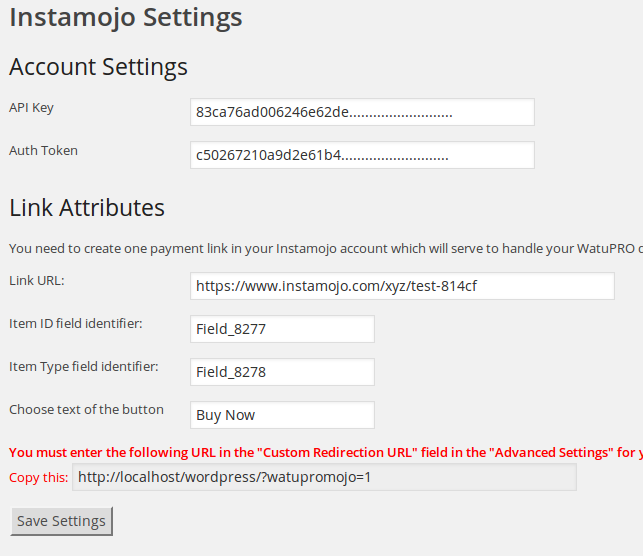
Before you can proceed you need the following:
- Your API key and Auth token. Once you have an Instamojo account you can obtain these from the Developers section.
- A dynamic payment link. The link must have a fixed price and “Pay what you want” options selected.
- The link must also have two custom fields added in the Advanced Settings section in your Instamojo link management page. One of the fields should be called item_id and the other field should be item_type.
- It needs to have “Custom redirection URL” attribute also set up. You can see the URL in your “Instamojo Integration” page in WatuPRO.
Once all this is done, ensure a couple more things:
1. You must enter the field identifiers of the custom fields in the Instamojo Integration page. The field indentifiers are visible in the “Custom fields” section of the Instamojo link management page for the given link. You need to mouse over the field names to see the identifiers.
2. You have to enter the following code inside your “Other payment instructions” box in WatuPRO Settings page (exactly as you see, just copy and paste)
[watupromojo-button amount="[AMOUNT]" item_id="[EXAM_ID]" item_type="[ITEM_TYPE]"]
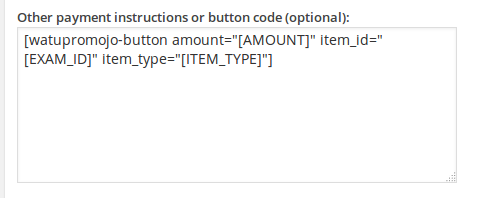
This will generate a payment link on your paid quizzes. It can work along with all other payment methods. The payment link has class “watupromojo-button” so feel free to style it.