Updated in 2021: It’s surprising how many of the old plugins were no longer active. Things in the web change fast! I have updated this post with the most recent and updated alternatives.
No doubt Moodle is the standard open-source solution for building educational communities and portals. It’s been around for years, it has a huge community, regular updates and contributions. It’s really good.
But forget about it. Use WordPress.
I’m not writing this to bash Moodle. I appreciate the efforts that the community puts in it. Contributing to Moodle is in my plans as well. However, 90% of people who use it can achieve nearly the same functionality with WordPress and several plugins. Advantages?
- WordPress is easier to install, update, and use
- It has an even larger community and more contemporary interface
- More free plugins
- Easier to host (less demanding in resources)
- A lot more premium plugins and themes
- A lot more developers available for customization
Need I say anything else? Just look at the downloads – Moodle is more than 70MB zipped! Way too much code and stuff, maybe good, but you don’t need most. The latest WordPress installation file is just 15 MB at the moment.
The most important Moodle functions can be replaced with similar, sometimes better, free and premium WordPress plugins and/or themes. On top of that you can add some more of WordPress awesomeness – SEO plugins, caching plugins, tons of little widgets and so on. And, you can still host a regular blog along with the educational suite if you wish.
Here is how to replicate the most important Moodle functions in WordPress:
Courses
The core of Moodle is creating courses, assigning user groups to them, course reports, assignments. There are two great WordPress plugins that will handle this in one or another way:
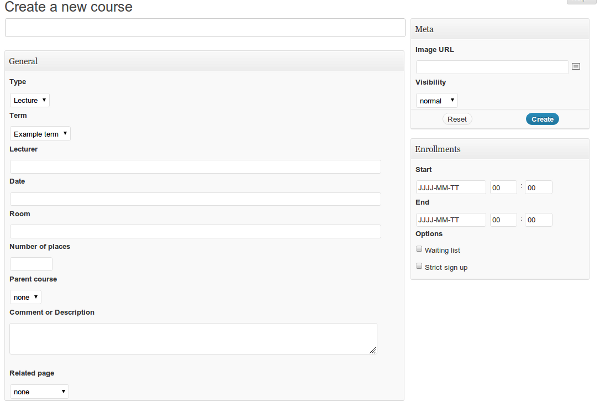
TeachPress is properly maintained and up-to date plugin for creating courses with enrollments and publication management. It has only one version that’s entirely free. Scroll down their site to see a bunch of screenshots and get an idea what you can do with it.
On the other hand if you want to run education suite that’s more of a community thing, you may want to first install BuddyPress. This thing is huge: it turns your WordPress site into a social network and then you can go further and extend it with more plugins and themes. (Right, this means to extend a plugin with plugins). So once you extend WordPress with BuddyPress you can add educational capabilities with the great BuddyPress ScholarPress Courseware. It’s also fully open-source and free, well supported and frequently updated plugin. Allows managing courses, lectures, basic quizzes, assignments, and schedule calendars.
Now there is also the completely free Namaste! LMS which is also built by us. We have huge plans on it, so it’s worth taking a look!
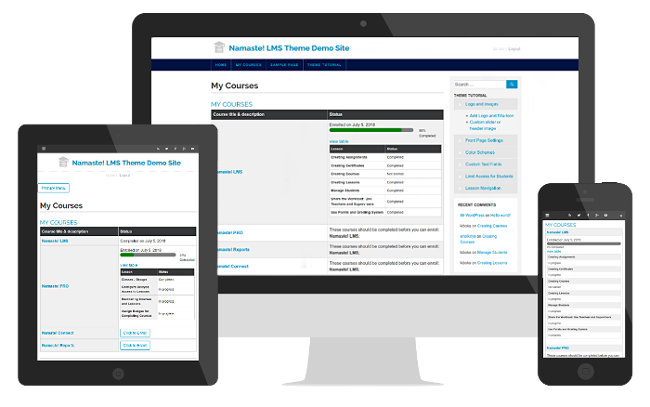
Namaste! LMS
If you are interested in further researching the LMS space, check this list from 2021.
As these all-in-one plugins sometimes don’t have exactly what you need and may be clumsy in some areas, there are more niche-ones that can handle individual tasks better.
Exams and Tests
This is the area where Watu comes in place (and sometimes you will prefer its premium version). Watu lets you create exams with single-choice, multiple-choices, or open-end questions. Assign grades, points, display results instantly. In the premium version you can also keep stats of the taken exams, limit by user group and categories, email user results, set times, assign certificates and so on.
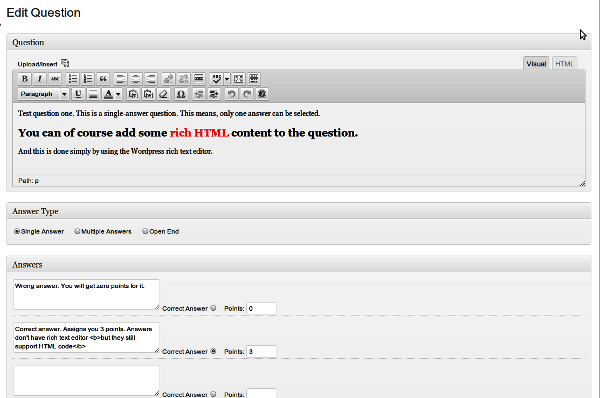
The Pro version has more question types, advanced grading system, and so on. Regardless the very powerful features, it’s pretty easy to get started with:
You may also want to check Quiz and Survey Master which is probably less easy to use but has some interesting features.
Our Chained quiz has unique chained logic features so it’s worth having a look for some specific learning sites!
Assignments
One great plugin for handling assignments is Cleverness To-Do List. Tasks can be assigned to different users along with deadlines, various permissions etc. Regular assignments for whole groups can be handled by adding a post to a selected group and connecting it with an exam.
Of course don’t forget that BuddyPress ScholarPress Courseware also has assignments module, and Namaste! LMS has assignments built in (and can be used as requirements to complete a lesson.
Chat
Chat plugins are abundant. You can use a simple self-hosted and free solution like 3CX Live Chat or get rid off the hosting hassles and subscribe for something like LiveChat or ChatRoll.
If you only need a pretty simple thing then install a shoutbox like Schreikasten or Buddypress-Ajax-Chat and you are all set.
Polls
Polls are useful not just for educational sites but also in marketing and sales, or any other site that needs to get user feedback. But for educational suite perhaps the most useful will be WP-Polls (free).
Now if you want to relate poll answers to users and extract more detailed stats you may prefer to use a plugin for creating exams or surveys. Watu Quiz can also be used for polls.
Forums
There is no shortage of solutions here as well. While BBPress is the standard choice, you may wish to check ForumPress or wpForo Forum which is more up to date.
You may notice I sometimes favor paid versions. This is not just to encourage paying for quality stuff and helping WordPress developers to do their great job. If you are running a site that makes money, spending few bucks on a premium plugin may help you stay over the competition by having something they don’t have. Premium plugins usually come with high-class support too and are more user-friendly (well, not always, but most of them are).
Glossary
Glossary is another thing you would want to do even if your site is not educational portal. But speaking about education sites, GM Tooltip Glossary is one of the best choices. The core plugin is entirely free but has several premium add-ons that are very well worth the money. Custom taxonomies can be petty important for example for a more advanced education site.
The simpler Glossary by Codeat is also and excellent choice and probably simpler to use.
Resources
Moodle has a Resource module which can display different media types along with a lesson or course. WordPress itself can handle resource listings in many ways – the simplest is just to use the rich text editor in a post or page and link to various files or media. Because of this, there aren’t any notable plugins for handling on-page resources. If you plan to list external resources you may want to check some directory plugins. In most cases the WordPress itself is good enough to handle this functionality by its core.
Survey
Although close to exams and quizzes, surveys have slightly different purpose. So the best plugin for adding surveys is probably WP Survey And Quiz Tool. A simpler solution is again Watu Quiz (besides its primary purpose is exams) and especially WatuPRO which has very powerful reporting features (and more are coming!).
There is also a good comparison post at Kinsta featuring some more plugins.
Wiki
Wikis can be very useful in learning communities as your members can save you a tremendous amount of work. (I guess I’d need to create Wiki on this blog, so members can write about wikis. How meta!).
An excellent premium wiki plugin was available from WPMUdev but they have retired the plugins 🙂
A decent simple alternative is Yada Wiki from the official WordPress repository. The plugin is frequently updated and probably going to continue being active.
Encyclopedia / Glossary / Wiki is probably a good alternative if you also want to run a glossary and don’t like the other alternatives.
Workshop
There are plenty of ways to handle workshops and events. If you need a simple thing Simple Events Calendar might be your choice. However a lot more powerful alternative is The Events Calendar and the Registrations module by Roundup WP. These are super powerul plugins and no surprise they are the most popular ones in this area.
If your workshops involve webinars you may need to use some webinar software too. The only decent plugin I found is quite pricey so you may prefer to use some hosted webinars solution outside of WordPress.
Yes, Moodle fans, some of these features are more complicated and rich in Moodle. But most of us don’t need that. WordPress works in 90% or so of the cases and most webmasters are more comfortable with it.
Update in 2021: When I wrote this article first almost 9 years ago this was true. WordPress and its education related plugins have advanced so much (so proud that we have contributed as well!) that it’s questionable if Moodle is still more powerful. I am of course open to criticism here because I am not an active Moodle user.
As for Moodle, it’s a great stuff if you really need what it offers and have the patience to learn working with it.
I certainly agree with much of your criticism of Moodle. To me, it is out of control in terms of versions and every version seems to have different quirks. However, a WP site with a bunch of different plug ins doesn’t seem very attractive. Certain functionality would need integration, i.e. enrollment, course management, testing etc.
There is a real need for a clean, efficient LMS. WP would make an excellent platform, but the plugins would need to work seamlessly together.
Best Regards
Thanks for the comment, Joe. Looks like there’s always room to develop a Moodle alternative then
I have just discovered Moodle. My mother uses it for her training institution and gave me access so I could see how it works. It seems very cluttered and messy and seems to have very little backend control. WordPress is such a useful environment and has room to be what ever you want. I like the fact that with wordpress I could combine the best parts of many environments such as social, blog, ILE, and much more into one unique and fresh website. Being that my website is just for a little village school in the republic of Georgia I don’t think I will be able to take advantage of a lot of the paid plugins but where there is a will there is a way. Thank you for your very extensive report on this subject. It will prove very useful.
Kind Regards
I’m in Georgia right now, drop me an email and we’ll arrange a free copy of WatuPRO for you.
I have signed up to your website and I can’t trace down your email address. Through signing up to your website, you should have access to my email. I’m out in a little village in Samegrelo so my magti internet is letting me down as always!!!! It’s very nice of you to offer me this and I will credit your website on my website. I need to make a page to credit some photoshop artists (as I had a moment of laziness crossed with finding some nice royalty free background images.) WatuPRO is just what I need for my students I am very grateful. Where in Georgia are you? and what brings you here?
Kind Regards
Your help is going towards helping a small school in a little village called Lesichine!
I was in Tbilisi and Yerevan for a couple of days. Now back in Bulgaria. I’ll send you email regarding the plugin.
I like Moodle because Moodle is obtainable where ever, when that extracts jointly the most powerful understanding practices. Pupils and also educators can potentially hook up to it in excess of a great number of out-of-the-box recreation plus sources that is certainly absolutely altered speedily.
Very good post – a direct inspiration of what we have created at LearnDash… the LMS for WordPress. One thing that I see missing (although not essential) from your feature list is TinCan API. For some, this isn’t a “must have”, but as the new generation of SCORM, it is the protocol by which anything is considered a “real” learning management system.
Moodle is archaic; and I mean that with good intentions. They need a face-lift (and will likely get one) as it is too rigid for today’s demands. There is a great blog post on our site that compares the two (WordPress and Moodle), if you don’t mind me posting the link, it can be found here:
http://www.learndash.com/advantages-of-wordpress-over-moodle/
In the end WordPress demonstrates its flexibility in so many ways, time to add “formal learning portal” to the list.
Well written. By the way, I’m a happy customer of some of your plugins. Keep it up.
Regards,
Justin Ferriman
Founder, LearnDash
Congrats on your launch Justin!
Can wordpress give you the option for student to check result? I know of drupal and joomla.
Pingback: Learning Management System (e learning) with WordPress |
Pingback: Learning Management System (e learning) with WordPress
I look after a Moodle installation with over 20,000 users.
I also look after a large WordPress multi user installation.
The two are completely different, you would have to be some kind of masochist to stitch togeter a rag tag bag of WordPress plugins and try to teach with it.
WordPress is a great publishing platform, but the fact it has a few add ons that can be used to generate a poll or stuff a wiki / bbpress forum does not make it an LMS any more than WooCommerce or ShopperPress makes it a full blown e-commerce platform like Magento.
WordPress is flexible, I love it, but outside of publishing its almost always a compromise.
If your core mission is to publish / sell content with a few add on’s then use wordpress.
If your core mission is to teach in a structured way that can scale then you should be looking at a proper LMS like Moodle.
Nice Info. Btw, can I install Namaste in BuddyPress? Thanks for answer 🙂
I hope so, never tried 🙂 Just go ahead and try it.
do we have any plugin who can manage student(user)’s attendance?
I have installed Namaste-LMS but find it difficult to master. Hereare some issues I am struggling with
1. How can I add “My Courses” to the main menu?
2. How can I add pages to a lesson?
I am missing a manual
Pingback: Hello World! | Didactic.dev
Great post. However, one of the problems running education on WP is that the exams and assessments plugins are VERY limited compared to Moodle. Yes you have single and multiple answers questions but they are limited in their structure. Moodle has 11 types of question giving a variety and flexibility. I would have loved to use the WP but the fact that I cannot create Matching Questions in WP the way Moodle does stops me.
Hi Rinald,
WatuPRO already supports five question types, and matching questions type is on the way.
Forget Moodle: WordPress Can Power Your Educational Portal – Not quite
Nicely written, but I’d reconsider using WordPress if you have any form of heavy online learning requirements.
This solution may work if you are just wanting to supplement you face to face delivery with some online components, however should you have any compliance requirements, governing bodies that wish to audit your delivery you may be in trouble.
When you are comparing the download size for Moodle in comparison to WordPress, I think you should be listing all of the plugins you need to download just to bring it up to be comparable Moodle, which according to the basics you have listed above weighs in at almost 13 MB. Then there is alll of the configuring required to get it to work as an ad hock LMS.
What about archiving student results and allowing students to make project submissions?
All of the functionality that you have listed with the add-on plugins come standard in Moodle, and are much more advanced tool in Moodle.
Also, I think your understanding of the Workshop module in Moodle may be way off as the Workshop module in Moodle allows for students to assess and be assessed by their colleges.
As much as I love WordPress, it is also not a simple and completely straight forward tool to use (although in parts simpler that Moodle).
A very interesting read. Thanks for posting.
Really, really very helpful to me. Thanks for writing!