
Category Archives: CalendarScripts

Arigato PRO 2.5 and Intelligence Module 1.0.7

The WordPress drip marketing plugin Arigato PRO 2.5 has been released. It’s Intelligence module is also updated to version 1.0.7. In order to get the most of the new Performance Stats page, when updating Arigato PRO to 2.5 it’s recommended to also update the Intelligence module to the latest version.

Here is the changelog between versions 2.4 and 2.5:

  • You can restrict by user role the feature “Automatically subscribe in this list everyone who registers in my blog”.
  • The feature “When user subscribes to this mailing lists, register them as subscriber for my site too” also allows selecting user role.
  • New page “Advanced Stats” will show you excellent overview of your best performing newsletters, autoresponder campaigns, top subscribers, and more.
  • Unsubscribe stats will show you which newsletters, autoresponder campaigns and individual autoresponder emails lead to most unsubscribed users (note that these stats are recorded from a recent version so you won’t get meaningful results from before installing 2.5).
  • When users unsubscribe, we’ll record which email they clicked the “unsubscribe” link from. This info will be shown in the subscribers list page if you choose to not delete the unsubscribed users from the Arigato PRO Settings page.
  • The plugin will now track where the subscribers come from – web form (and on which page), added by admin, imported, subscribed by email, auto-subscribed, or subscribed by some custom method. This information will be visible in your list of users and can be filtered in the search form.
  • The number of active and unsubscribed users is now shown under each mailing list on the Mailing Lists page
  • Added num. sent & num. unsubscribed users under the list of emails in an autoresponder campaign. Same done for newsletters.
  • Custom fields will also be included in the search subscribers form. Note that the search is text-based and works the same way as searching in the default fields.
  • You can now easily setup your blog homepage or selected URL to work as “Squeeze page” and not show any of the WordPress header, footer, sidebar etc links.
  • Advanced role management lets you specify which pages and what access to them will be given to the different user roles. This lets you get your team members involved into the autoresponder management without giving them access to the whole functionality of the plugin. This configuration is available through a new link in the “Roles” section of the “Settings” page.
  • New setting lets you choose whether the unsubscribe page will display all lists or just the current list the user is unsubscribing from.
  • [Intelligence module] Post contents is also added as variable for the digests
  • [Intelligence module] New trigger: when user stays subscribed for X days do Y
  • [Inteligence module] Basic responsive template included

The update is sent by newsletter to eligible customers. If your free upgrades subscription has expired, you can renew for another full year for 40% of the regular price.

Using Question Difficulty Levels

From version 4.8.3.5 the WordPress quiz plugin WatuPRO adds a new important feature: question difficulty levels.

What Does It Do?

There are several reasons to use question difficulty levels in your quiz system:

  • To limit which difficulty levels are shown in a given quiz. This can be useful if you want to try how users perform on the quiz depending on how difficult questions are shown. Alternatively you can use one quiz as question bank and show questions of different difficulty levels in different quizzes.
  • To limit what kind of questions do users access. An option lets you manually give access to certain difficulty levels to every user from the Edit user page.
  • To let users unlock difficulty levels automatically based on their performance. You can do this by defining unlock criteria as explained below.

How To Use It

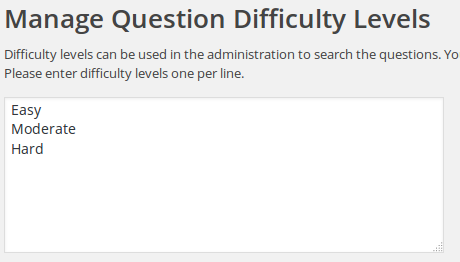
To create some difficulty levels go to the WatuPRO Difficulty Levels page and write them one per line:
difflevels

Once saved, you’ll get the following new options:

  • A drop-down selector in the Edit Quiz page

    diff-selector
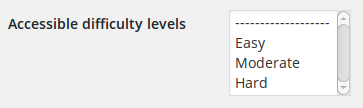
  • A multi-select drop-down menu in the Edit User page (from your main WP Users page):
    user-diff-levels

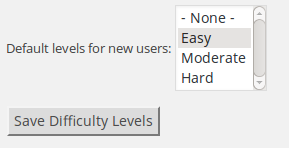
When you select “Apply difficulty level restrictions per user account.” checkbox on the Difficulty Levels page you’ll also get options to setup default difficulty levels for new user accounts:
default-diff-levels

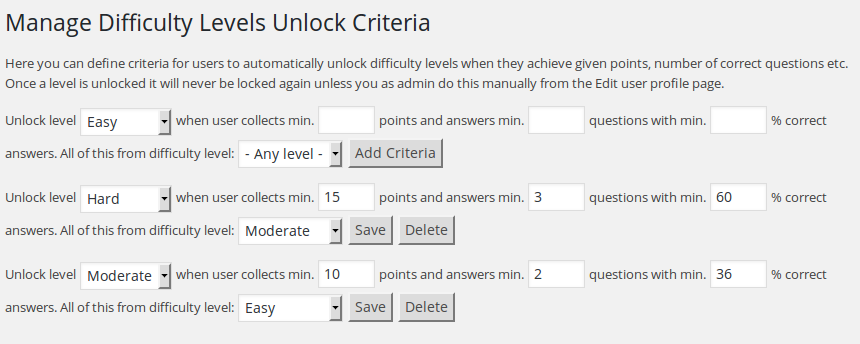
And the options to create unlock criteria will also appear. Here is example of automatic unlock criteria:
unlock-criteria

This means that for each difficulty level you can add criteria for automatic unlocking. When user completes a quiz, their points and correct answers are calculated. If criteria are satisfied a new question difficulty level will be unlocked and the user will be notified about this by flash message on the “Final screeen” on the quiz they just completed.

The “Unlock log” in the admin “Difficulty levels” page will let you know who and when has unlocked a new difficulty level.

Arigato Pro Community Translations

Thanks to some of our customers we are starting a page with community translations for Arigato PRO. If you have translated the plugin and want to share your work with the others, please let us know on info@calendarscripts.info

Croatian Translation

This translation is provided by Sanjin and is actual  to Arigato PRO 3.1.5:

bftpro-hr.po / bftpro-hr.mo

Inelligence module:

bfti-hr.po / bfti-hr.mo

Japanese Translation

The following translation is provided by Atsushi Wadamine from http://edusolu-english.com/

bftpro-ja.po / bftpro-ja.mo