
Category Archives: CalendarScripts

WatuPRO Simple Designer Plugin

This is a small free add-on for our quiz plugin WatuPRO that lets you redesign the way some questions work.

The result is very effective as you can see on this version of our open demo quiz. Instead of selecting radio buttons and checkboxes users will click on the answers directly. And depending on what you select in the settings of the new plugin the correct/incorrect check-mark can be displayed immediately.

Note: the plugin does not work well with the following option selected in WatuPRO:

Better choose some of the WatuPRO design themes with “buttons” in their name instead of the SImple Designer to achieve similar functionality.

Download WatuPRO Simple Designer:

Download version 1.1 (16kb)

Please note this plugin requires that you have WatuPRO. It won’t do anything without it.

How To Use It:

Once installed and activated, a new link will appear under your WatuPRO menu:
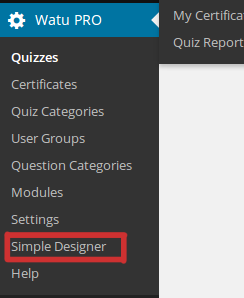
simple-designer-in-menu

Click on it and you’ll be taken to the plugin settings page. Choose colors there, define whether the result should be shown immediately (note: means more Ajax requests to your server), and select which quizzes you want this design applied to:
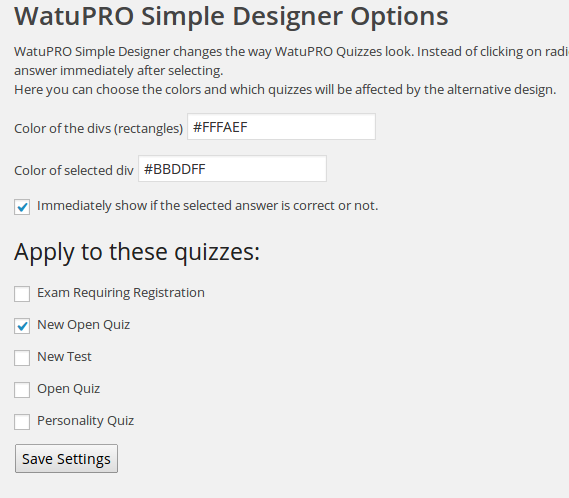
simple-designer

That’s it. Once set up, you’ll see the changes.

Category Tabs

From version 0.7 this plugin adds one more enhancement. For quizzes paginated “one page per question category” you will be able to use nice shortcodes for category tabs. See the “Simple Designer” page in your WatuPRO menu (after installing version 0.7) for more info.

True / False Questions in WatuPRO

From version 4.3.2 WatuPRO, the WordRress quiz plugin, supports a True / False question type. This is a sub-type of the “single answer” questions and can be enabled by selecting the checkbox which shows only when “Single answer” is selected:

truefalse


What are the specifics of True / False Questions?

They are single-choice questions and generate radio buttons just like them. However:

  • When you select this type the two answers are automatically added (saves time)
  • These answers never randomize – True is always on top
  • There are always exactly two answers shown – True and False, regardless of any limits set for the quiz.

True / false questions are small but very useful addition built per customer requests.

WatuPRO 4.3 – New Import Formats, New PDF Bridge, and More

Version 4.3 of WatuPRO, the WordPress quiz plugin, is now ready:

  1. A major rework has been done on import/export (the legacy formats are still supported). Now we have a very simple format, advanced format with all properties, and Aiken format. More info at https://blog.calendarscripts.info/new-imports-from-watupro-4-2-3/
  2. Marking a question as important ensures it will get included with priority if you are pulling only subset of all quiz questions
  3. The free PDF Bridge has been reworked to use the MPF library. Now it can work with foreign characters and complicated designs
  4. The {{{points}}} variable can now be used in the “Optional answer explanation” field to display how many points the user has earned on the question.
  5. Added “% Correct answers” to the results list page (also in the filters & exports on the page)
  6. When copying quizzes from the free Watu you can now select the shortcodes to be automatically replaced with WatuPRO shortcodes
  7. You can also copy the current user results from Watu basic to WatuPRO
  8. A new display code lets you include the individual user’s answer to each question into the final screen or certificate contents. You’ll find the code at the top of the Edit Question page
  9. Mass-apply new category to selected questions on the Manage Questions page
  10. Option to penalize unanswering a question with a number of negative points
  11. Configuration allows you to select whether to show “My Quizzes” and “My certificates” pages in user dashboard. If you have the Reporting module, you can also select which tabs to be shown there.
  12. Option to randomize answers but not questions
  13. A new variable %%TIME-SPENT%%  in the final screen shows the time spent when taking the test.
  14. A new option lets users make each of their certificates visible by everyone (including non-logged in visitors)
  15. You can view who and when has started but not finished a quiz, and delete these attempts
  16. The shortcodes that display lists of quizzes now let you order them by title or by latest on top. Check the Help and Categories pages for more information.
  17. You can choose to not show paid quizzes that have not been purchased in “My quizzes” page (Intelligence module)
  18. Sorting questions can now be treated as a whole and assign points when the entire set is sorted correctly or not (Intelligence module)
  19. Advanced setting option lets you switch off the “You did not select or enter any answer” confirmation popup (Intelligence module)
  20. Advanced setting lets you enable enumeration on answers – numeric or alphabetic (Intelligence module)
  21. Shortcodes to display “Stats per question”, “All question answers” and “Chart by grade” pages (Reporting module)
  22. Fixed edge case bugs with “redirect to shareable final screen” option
  23. Watupro is now qTranslate compatible so you can easily have multi-language quizzes.

Eligible customers have received their upgrade. In case your one year free upgrades / support package has expired you can renew it for 40% of the regular price.