Category Archives: CalendarScripts

BroadFast For WordPress 2.2, Intelligence Module 0.8.5

An important upgrade to the WordPress autoresponder has been released and sent to eligible customers. Here are the new and improved features:

  • Now it’s easy to change the text of the “Subscribe” button or use a graphic instead of button
  • Segmentation allows you send emails only to selected segments of your mailing lists (Intelligence module required)
  • Select time of the day when autoresponder email should be sent
  • Added email sending error log
  • Added explanations about “In queue” and test “cron job” link
  • Question based captcha can be used instead of (or along with) reCaptcha
  • You can now automatically have users who subscribe to your mailing list be subscribed also to your blog (as WordPress users)
  • Email templates (Intelligence module). More info here

If you are customer who didn’t get their upgrade, please email us to get it. If your order is more than 1 year old you can renew upgrades and support for another year with 60% discount.

Someone asked us why updates aren’t sent through the WordPress dashboard. Unfortunately WordPress doesn’t allow commercial plugins in the repository so this is not an option. It is not impossible to build our own update procedure but it’s really complicated work because we’ll need to also check if the user who’s getting the upgrade is active customer. Believe me, you don’t want to deal with entering license keys and problems when the domain name isn’t found in a registry. It’s much easier to delete the old plugin and install the new one once in few months.
Getting “None” for Grade/Result in WatuPRO

Here’s a frequently asked question. Why are my users sometimes getting “None” as grade/result on a quiz?

The answer is that None is shown when no grade/result matching the points or percentage achieved is found. This is always the reason, no exceptions.

So please check your grades. They must cover the whole possible range of:

a) points, if you are calculating grades by points (this is the default option)

b) percentage, if you have selected “Calculate grades by % correct answers instead of points collected”. For versions older than 4.2.5 please make sure that your percentage based grades overlap so any decimals are covered. For example if grade A is defined as 80% to 100% correct answers, then the lower grade should be defined as (for example) 60% – 80% and NOT to 79%. Versions newer than 4.2.5 will round the percent to whole number so this will not be required.

You can use the variables %%POINTS%% or %%PERCENTAGE%% on the final screen to help you figure out what is achieved by the user and why they are not getting any grade.

Please also don’t confuse category grades with global grades.

Email Design Templates in Arigato PRO / Intelligence Module

Design templates allow you to quickly attach pre-defined designs to newsletters or autoresponder email messages in Arigato PRO for WordPress (Intelligence module required).

The “Design templates” feature is available from the following versions:
– Arigato PRO version 2.2
– Intelligence module version 0.8.5

Here is a quick example of how to use the feature:

1. Create your design template

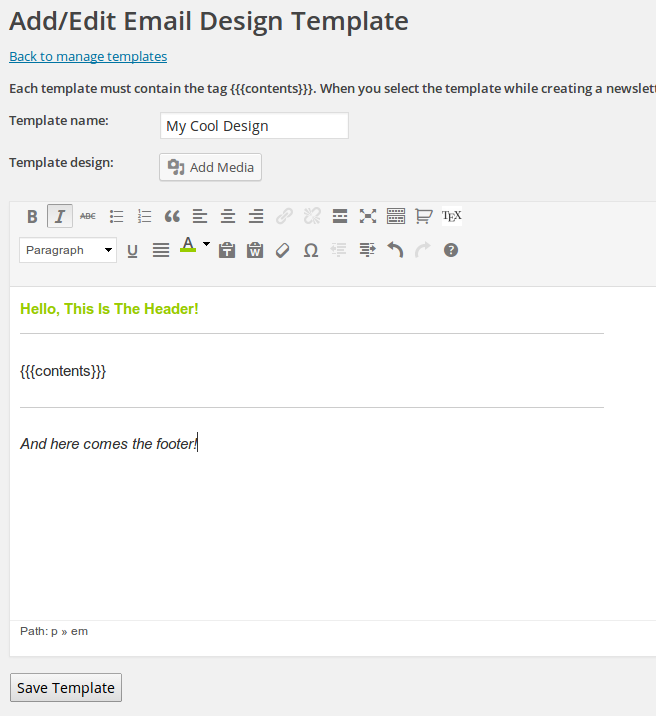
There is nothing special about this – you can design visually or enter HTML code. The only important thing is that each template is required to contain the {{{contents}}} mask in the place where you want your specific email contents to appear. Example:

design-template


2. Create Your Newsletter or Autoresponder Message

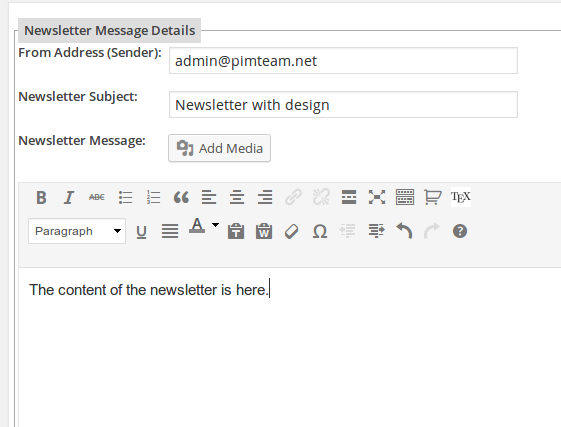
Create your message having in mind the design you want to apply. Nothing special here as well:

newsletter


3. Select Your Design

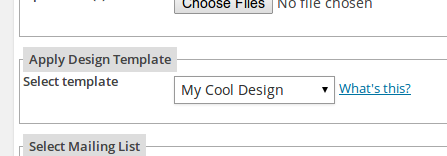
While creating or editing the email message, select your design template:

select-design


4. That’s it!

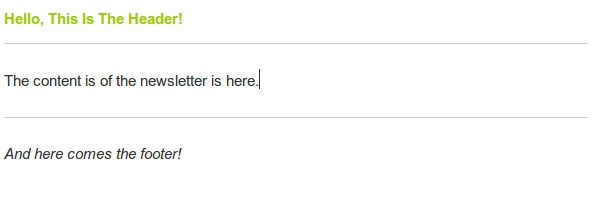
Here is how your current email message will look when the template is automatically applied during sending:

message

Important about new lines

If your HTML template contains any HTML tags we will not automatically add new lines or paragraphs to avoid breaking your code. In such cases you have to use proper HTML to format paragraphs – use <p> tags where you want to have different paragraphs.